



Payment Factory vs Payment Hub: both terms come up in every conversation about payment centralization, and most people use them interchangeably. They aren't the same. The difference goes to what your finance department can or cannot do with a single tool — and it has real consequences on how you standardize flows, manage your banking relationships, and negotiate your fees.
Payment Hub: simple centralization
To understand Payment Factory vs Payment Hub, the Hub is the place to start. A Payment Hub centralizes payments through a fixed, non-customizable workflow. Subsidiaries connect to it to send their payments straight to their banks.
The profile fits companies that are:
- mid-sized to intermediate in scale;
- not currently planning international acquisitions;
- limited in their needs for centralizing and standardizing payment processes;
- working with little customization to anticipate (workflows, batching criteria, task scheduling).
What a Payment Hub does
Receives ERP files
The Hub receives payment files from the ERPs of subsidiaries.
Validation workflow
Validation happens on the subsidiary side through a fixed, non-customizable workflow.
Transmission to banks
Files are sent to banks without format modification: the data passes through as-is.
Aggregated dashboard
Displays totals and counts. Individual payment details are typically not accessible.
Payment Factory: augmented centralization
Where Payment Factory vs Payment Hub really diverges is on customization. A Payment Factory is a comprehensive, customizable payments solution calibrated for large enterprises. It adapts to your current and anticipated processes: file formats, workflows, business rules.
Unlike the Hub, a Factory can create payments from multiple sources (invoices in the ERP, for example), convert file formats coming from different entities, consolidate them, and route them to target banks for each centralization point (by region, by currency, however you define it). Payment and collection processes become standardized, regardless of which country sends the payment or where the beneficiary sits.
Effect on group treasury: bank relationships consolidate, and the volume concentrated at each banking partner gives you real leverage when negotiating fees.
What a Payment Factory does (on top of the Hub)
In essence: Payment Factory vs Payment Hub
A Payment Hub focuses on the streamlined execution of pre-defined payments. It validates the files, transmits the data as received, and automates at a basic level.
A Payment Factory goes well beyond execution: it creates new payments, runs advanced controls, enriches data, and handles workflows of any shape.
Payment Factory vs Payment Hub comparison
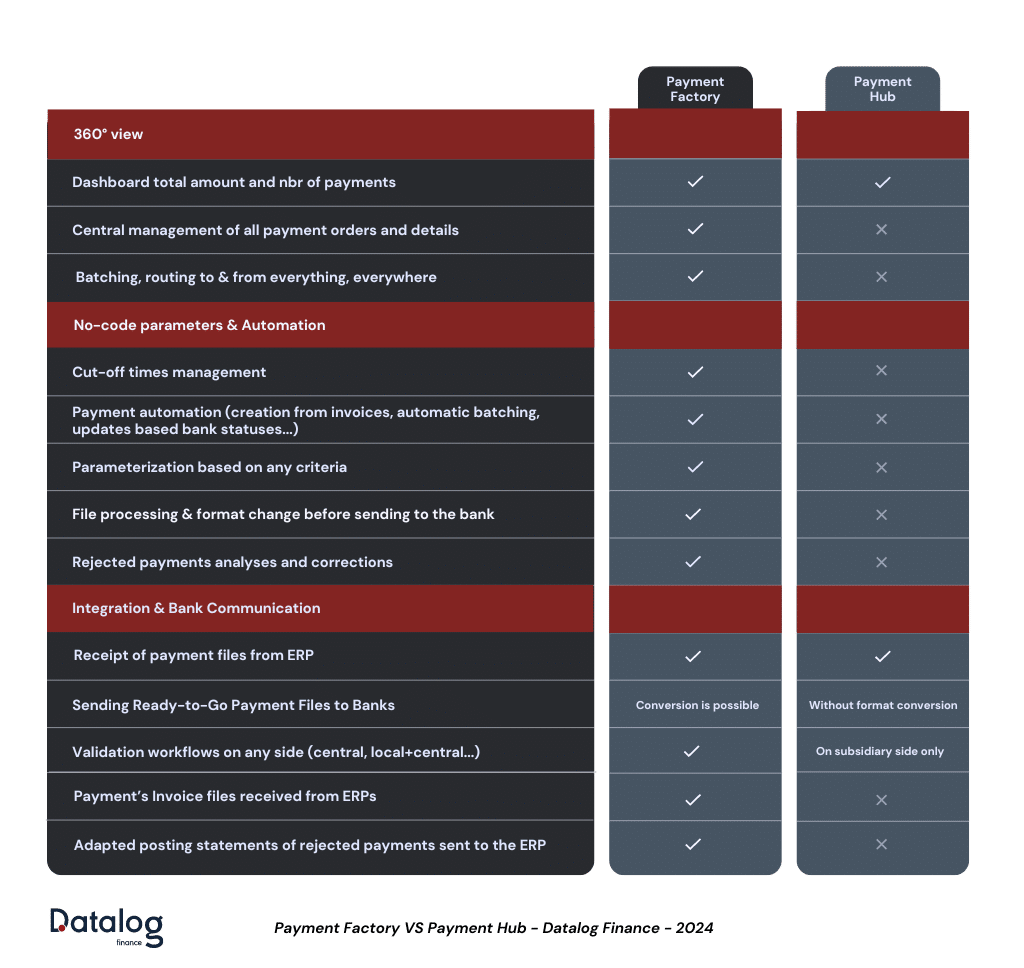
How Datalog TMS Payment Factory optimizes payments
On the operational side, the Payment Factory vs Payment Hub debate gets settled on the advanced features. Datalog TMS Payment Factory offers several capabilities that streamline payment processing.
Batching and routing
Consolidated batch creation: gather payments from any ERP and any subsidiary, then create new batches based on user-defined rules.
- Grouping options: group payments by currency, amount range, country, beneficiary bank, or any other criterion that fits your treasury setup.
- Intelligent bank routing: route payments to specific banks based on pre-negotiated allocation percentages (e.g., 10% to Bank 1, 20% to Bank 2). Distribution follows your banking agreements automatically.
Example: optimizing payments with POBO (Payment On Behalf Of)
Datalog TMS Payment Factory lets you manage payments on behalf of subsidiaries (POBO), reducing costs and centralizing control.
Converting cross-border payments to domestic ones: by grouping payments by currency and routing them to bank accounts held in the corresponding country, you turn cross-border transactions into domestic ones. Payment fees drop, FX management centralizes at the group treasury level, control improves, and you get access to better exchange rates.
Real-world scenario
A French subsidiary needs to pay an invoice to a Japanese supplier. The traditional way: the ERP generates a cross-border payment debiting the French subsidiary's account — high fees, FX exposure.
With Datalog TMS, the bank account held in the right currency takes over automatically, following the rules you define.
With Datalog TMS Payment Factory, the group can:
- Gather all payments from all subsidiaries.
- Build batches by currency (here, all Japanese Yen payments).
- Route each batch to a bank account held by group treasury in Japan.
- Let group treasury handle the payment to the Japanese supplier. The Payment Factory effectively turns the operation into a domestic Japanese transaction.
The In-House Bank cuts fees for subsidiaries and centralizes FX management at the group level for better control.
Datalog TMS Import/Export Module
At the heart of any Payment Factory is an import/export module that handles data exchange with ERPs and banks without requiring programming skills. The no-code module of Datalog TMS offers several key capabilities.
Flexible file format creation
Create new file formats from scratch to accommodate the data structures used by different ERPs and banks.
Mapping and interface design
Map external file fields to corresponding internal database fields for reliable data transfer.
Data transformation
Correspondence tables convert data on import or export to match the required format.
Data enrichment
Enhance payment data by pulling information from other databases in your system.
Data validation and controls
Automated checks on critical fields: amounts, bank account details, SWIFT codes.
User-friendly configuration
Every feature in the import/export module is configurable by business users — no technical knowledge required. Teams manage their data exchange processes on their own, which keeps the dependency on IT to a minimum.
Also on our blog:
Want to see how Datalog TMS Payment Factory handles your payment flows?
→ Request a Datalog TMS demo